Odoo Helpdesk implementation
We set up Odoo Helpdesk so support tickets connect to the customer's orders, products and invoices, and service levels are measured.
At a glance
| What it is | The customer support app within Odoo |
| Best for | Businesses on Odoo that support products or services after the sale |
| Works with | Odoo Sales, Inventory, Field Service, Timesheets and Website |
| Our role | Team and service level setup, channels, after-sales flows, training and support |
| Pricing | See Odoo's website for current plans |
The short answer
Odoo Helpdesk tracks support tickets by team and stage, applies service level targets and connects each ticket to the customer's orders, returns and invoices. It suits businesses on Odoo whose support needs that context. BookMyTechies configures teams, channels and after-sales processes.
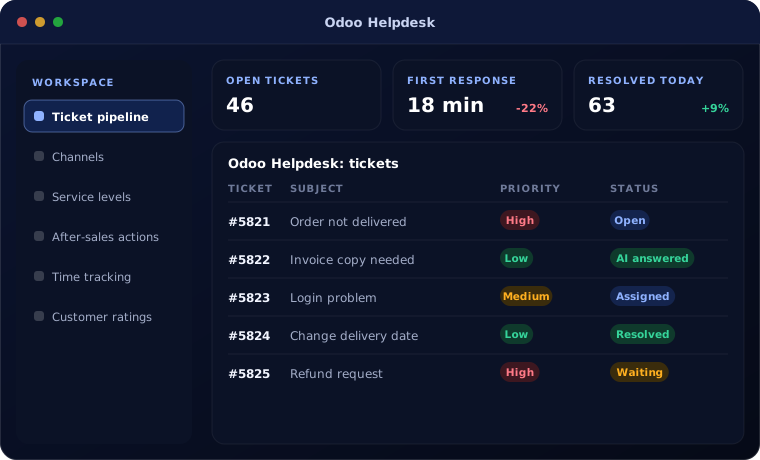
What Odoo Helpdesk does
Odoo Helpdesk ties support to the rest of the business.
Ticket pipeline
Tickets tracked through stages by team, on a visual board.
Channels
Tickets created from email, website forms and live chat.
Service levels
Response and resolution targets, with alerts before a breach.
After-sales actions
Returns, refunds, repairs and field visits started from the ticket.
Time tracking
Hours recorded on tickets and invoiced where support is chargeable.
Customer ratings
Feedback collected when a ticket is closed.
Is Odoo Helpdesk the right fit?
Odoo Helpdesk fits when support needs order and stock data.
A strong fit when
- Support handles returns, repairs or warranty claims
- You already run sales and stock in Odoo
- Some support is billable by the hour
- You want service levels measured
Look elsewhere when
- You need a help desk only, where Zoho Desk is stronger on its own
- You need a large omnichannel contact centre
- You do not use Odoo for sales or stock
How we implement Odoo Helpdesk
We design support around your real request types.
Review requests
We look at what customers ask, the channels they use and how it is handled.
You receive A map of request types
Design
We define teams, stages, service levels and after-sales steps.
You receive A configuration plan
Configure
We set up teams, channels and automation.
You receive A working helpdesk
Connect
We link returns, repairs, timesheets and invoicing.
You receive Tested after-sales flows
Train
Agents and managers are trained on live tickets.
You receive Training and a guide
Problems we are asked to solve
These are the support problems clients describe.
| The situation | What we do |
|---|---|
| Agents cannot see what the customer bought | Show orders, deliveries and invoices on the ticket |
| Returns are handled outside the system | Start the return and refund from the ticket |
| Billable support is not invoiced | Record time on tickets and invoice it |
| Nobody measures response times | Apply service level policies and report on them |
Related products
Support connects to sales, stock and field work.
Common questions
Is Helpdesk part of every Odoo edition?
It is an Enterprise app. We confirm edition requirements during planning.
Can customers raise tickets from our website?
Yes, through a form or their customer portal.
Can it handle product returns?
Yes. Returns, refunds and repairs can be launched from the ticket.
Can support time be charged to customers?
Yes, through timesheets linked to a sales order.
How this page is maintained. Written and reviewed by the BookMyTechies implementation team, based on our project work. Product details are checked against Odoo’s documentation, and pricing is linked to Odoo’s own page because it changes.
Explore further
The same job on other platforms
AI automation for this
Often used alongside
Support disconnected from orders and stock? Talk to us.
Tell us what your support team handles. We will show you how Odoo Helpdesk connects it.