Customer service automation that customers actually like
Customer service automation answers routine questions instantly, routes the rest to the right person with full context, and keeps every conversation in one place.
At a glance
| What it automates | Classification, routine answers, routing and follow-up |
| Works with | Zoho Desk, Odoo Helpdesk, Dynamics 365 Customer Service |
| People stay in charge of | Complaints, exceptions and relationships |
| Typical start | Email and website chat |
The short answer
Customer service automation uses AI and workflows to handle the predictable part of support. Requests from email, chat and forms are classified, routine questions such as order status are answered from your systems and knowledge base, and complex or sensitive cases go to the right agent with a summary. Customers get faster answers and agents spend time where it matters.
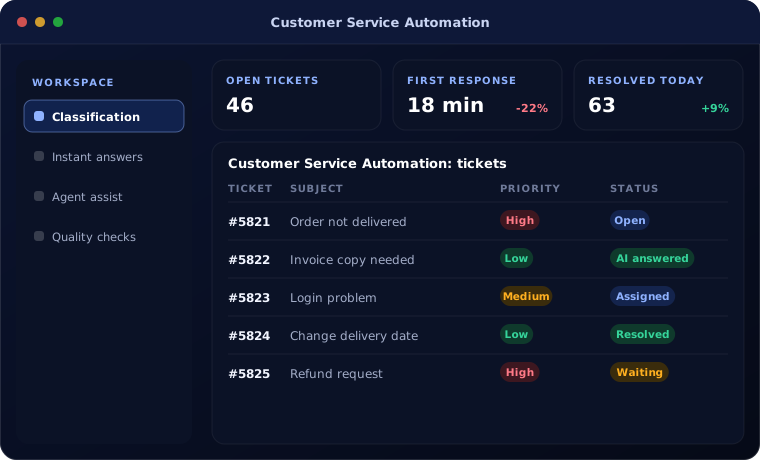
Why support teams fall behind
Most support teams answer the same questions every day: where is my order, how do I reset, what does this invoice mean. Meanwhile urgent issues wait in the same queue.
Answers vary between agents and context is lost between channels.
How the work is usually done today
- Requests arrive by email, phone and chat
- An agent reads and assigns each one
- The same questions are answered by hand
- Information is looked up in several systems
- Follow-ups are missed
What AI changes
Automation handles the routine; people handle the relationship.
Classification
Requests sorted by topic, urgency and customer.
Instant answers
Order status and common questions answered from live data.
Agent assist
Suggested replies and case summaries for agents.
Quality checks
Sentiment and response times monitored.
How customer service automation works
A request moves like this:
Receive
Email, chat or form creates a ticket.
Handled by Automation
Understand
AI classifies the request and gathers order data.
Handled by AI agent
Answer or route
Routine questions answered; others routed with a summary.
Handled by AI agent
Resolve
An agent handles complex cases.
Handled by Person
Follow up
Satisfaction check and knowledge base update.
Handled by Automation
Where people stay in control
Customers can always reach a person.
- A person is one click away in every automated conversation
- Complaints and unhappy customers go straight to an agent
- AI answers only from approved sources
- Conversations are logged and reviewable
Security and governance
- Access limited to the documents and records each step needs
- Every automated action logged with who or what made it
- Data kept in your own systems and approved cloud services
Systems this connects to
What you can expect
Typical outcomes:
- Faster first response
- More requests resolved without waiting
- Consistent answers across agents
- Better visibility of customer issues
Common questions
Will customers know they are talking to AI?
Yes. We recommend being clear about it, and always offering a route to a person.
Can it answer in Hindi and other languages?
Yes. Modern AI models handle many languages; we test the languages your customers use.
Does it work on WhatsApp?
Where your helpdesk supports a WhatsApp integration, the same automation can be applied.
What if the AI does not know the answer?
It hands the conversation to an agent with a summary, rather than guessing.
Explore further
The same job on other platforms
AI automation for this
Often used alongside
Is your support team answering the same questions every day?
Tell us your volumes and channels. We will show you how much can be automated well.