Invoice processing automation from inbox to ledger
Invoice processing automation reads every supplier invoice that arrives, checks it against the purchase order and goods received, and prepares the entry in your accounting system for approval.
At a glance
| What it automates | Capture, checking and posting of supplier invoices |
| Works with | Zoho Books, Odoo Accounting, Business Central, Dynamics 365 Finance |
| People stay in charge of | Approvals, mismatches and new suppliers |
| Typical start | One entity, one invoice inbox |
The short answer
Invoice processing automation uses AI to read invoices from email or scans, extract the supplier, amounts, tax and line items, match them to purchase orders and receipts, and create a draft bill in your accounting system. Finance staff only review exceptions and approve. It is one of the fastest AI projects to pay back because the volume is high and the rules are clear.
Why invoice processing is slow today
Supplier invoices arrive as PDFs, scans and photos in several inboxes. Someone opens each one, types the details into the accounting system and chases the right person for approval.
Errors creep in through mistyped amounts, duplicate payments and missed early-payment discounts, and month end waits for the backlog to clear.
How the work is usually done today
- Invoice arrives by email or post
- Someone downloads or scans it
- Details are typed into the accounting system
- The invoice is checked against the order by hand
- It is sent around for approval by email
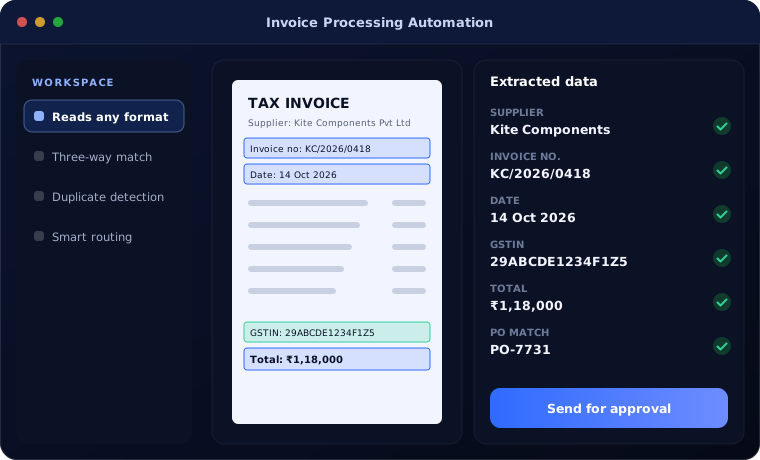
What AI changes
AI handles the reading, checking and routing, so the team handles judgement.
Reads any format
PDF, scan or photo, in different layouts, without templates for each supplier.
Three-way match
Invoice compared with purchase order and goods received note, line by line.
Duplicate detection
The same invoice sent twice, or by two routes, is caught before payment.
Smart routing
Each invoice goes to the right approver based on amount, department and supplier.
How invoice processing automation works
This is how an invoice moves through the automation.
Capture
Invoices are collected from the shared inbox, a scanner folder or a supplier portal.
Handled by Automation
Extract
AI reads supplier, invoice number, dates, tax, totals and lines.
Handled by AI agent
Match
Values are checked against the purchase order and receipt.
Handled by AI agent
Review exceptions
Mismatches, new suppliers and high values are sent to a person.
Handled by Person
Post and approve
A draft bill is created and approved in the accounting system.
Handled by Person
Where people stay in control
Money only moves when a person says so.
- Every bill is approved by a person before payment
- Mismatches above your tolerance always go to review
- New suppliers and bank detail changes are flagged
- Your team can correct any extracted value
Security and governance
- Access limited to the documents and records each step needs
- Every automated action logged with who or what made it
- Data kept in your own systems and approved cloud services
- Bank detail changes require a separate verification step
Systems this connects to
What you can expect
Results depend on invoice volume and how many arrive with purchase orders. These are the changes clients typically see.
- Most invoices processed without typing
- Faster approvals and fewer late payment charges
- Duplicate payments caught before they happen
- Month end no longer waits for an invoice backlog
Common questions
Do we need a template for every supplier?
No. Modern AI document reading handles different layouts without a template per supplier. We test it on a sample of your real invoices first.
What if the AI reads a value wrongly?
Values that fail checks, or where the AI is unsure, are sent to a person to confirm. Nothing is paid without approval.
Does it handle GST invoices?
Yes. It extracts GSTIN, tax rates and amounts and checks that the tax calculation adds up.
How long does it take to set up?
A first version for one inbox and one accounting system usually takes four to six weeks, including testing on your own invoices.
Explore further
The same job on other platforms
AI automation for this
Often used alongside
How many invoices does your team type each month?
Tell us. We will estimate how much of that work invoice processing automation could take over.