System integration services that connect your business
Our system integration services connect the software your business already runs, so orders, customers, stock and payments move between systems without anyone copying them.
At a glance
| What it is | Connecting business systems through APIs, connectors and automation |
| Typical links | CRM to ERP, store to inventory, bank to accounts, forms to CRM |
| Tools used | Native connectors, Zoho Flow, Power Automate, Odoo and custom APIs |
| Our role | Design, build, monitoring and support of integrations |
The short answer
System integration means making separate applications share data automatically. A won deal in the CRM creates the order in the ERP, an online sale updates stock, a bank payment marks the invoice paid. BookMyTechies designs integrations with clear ownership of each piece of data, error handling and monitoring, so they keep working after the project ends.
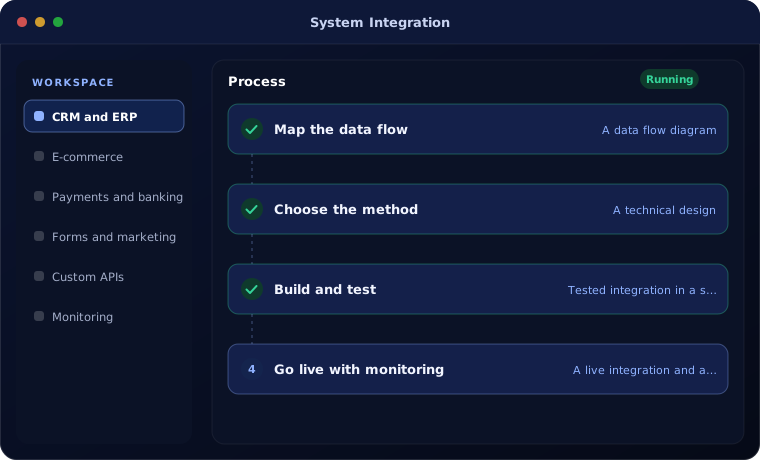
What our system integration services cover
Most of the value of business software sits in the connections between systems.
CRM and ERP
Customers, quotes, orders and invoices flow between sales and operations without re-entry.
E-commerce
Online orders, customers and stock synchronised with inventory and accounting.
Payments and banking
Payment gateways and bank feeds linked to invoices for faster reconciliation.
Forms and marketing
Website forms, campaigns and chat linked to the CRM with source tracking.
Custom APIs
REST and webhook integrations for systems without a ready-made connector.
Monitoring
Failed syncs are logged and alerted, with a clear way to retry or correct them.
Is integration the right fix?
Integration solves re-entry and mismatched data. It does not fix a process that is unclear.
A strong fit when
- The same data is typed into two or more systems
- Figures in sales, stock and accounts never quite agree
- You plan to keep a system and connect it rather than replace it
- You need real-time updates between teams
Look elsewhere when
- The underlying process is undefined, which needs mapping first
- Two systems do the same job, where consolidation is cheaper
How we build integrations
Integrations are small software projects, and we run them that way.
Map the data flow
We decide which system owns each piece of data and when it moves.
You receive A data flow diagram
Choose the method
Native connector, automation platform or custom API, chosen for reliability and cost.
You receive A technical design
Build and test
The integration is built and tested with real scenarios, including failures.
You receive Tested integration in a staging setup
Go live with monitoring
Logs and alerts are switched on so problems are seen early.
You receive A live integration and a runbook
Integration problems we fix
These are common with integrations built in a hurry.
| The situation | What we do |
|---|---|
| Records duplicate every time the sync runs | Add unique keys and matching rules |
| A sync fails silently and nobody notices for weeks | Add logging, alerts and a daily summary |
| Stock levels on the website are wrong | Make inventory the single source and sync on every change |
| A connector broke after an update | Rebuild it on supported APIs and document it |
Related services and platforms
Integration links to most of what we do.
Common questions
Which systems can you integrate?
Any system with an API or export, including Zoho, Odoo, Dynamics 365, Business Central, Shopify, WooCommerce, payment gateways, banks and most industry software.
Should we use a connector or a custom integration?
Use a ready connector when one exists and covers your needs. We build custom integrations when the data or rules are specific to your business.
What happens when an integration fails?
We design every integration with logging and alerts, so failures are reported and can be retried or corrected.
Who maintains the integration?
We document each integration and can support it under a monthly plan, or hand it over to your team.
Explore further
The same job on other platforms
AI automation for this
Often used alongside
Tired of copying data between systems?
Tell us which systems you use. We will show you which connections would save the most time.