Zoho Flow integration and workflow automation
We build integrations in Zoho Flow that pass data between your Zoho apps and other tools, so nothing is copied by hand.
The short answer
Zoho Flow connects applications so that an event in one triggers actions in others, without custom code for common cases. It suits businesses whose staff copy information between systems. BookMyTechies designs the flows, adds logic where the standard connectors fall short and monitors them once live.
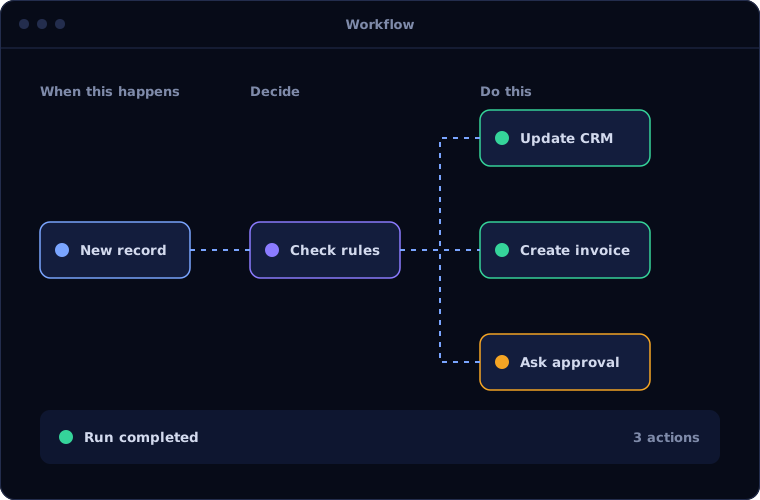
What Zoho Flow does
Zoho Flow moves data between your systems. These are its main building blocks.
Triggers
A flow starts when something happens, such as a new lead, payment or form entry.
Actions
Records created or updated in other apps as a result.
Logic
Conditions, delays and branches decide what happens in each case.
Custom functions
Scripted steps for transformations the standard actions cannot do.
Webhooks and APIs
Connections to systems that have no ready-made connector.
History and alerts
Every run logged, with notifications when a flow fails.
Is Zoho Flow the right fit?
Flow is the right tool for many integrations. Some need a different approach.
A strong fit when
- Staff re-enter data between two or more apps
- The apps involved have connectors or usable interfaces
- The logic can be described as when this happens, do that
- You want integrations your own team can see and adjust
Look elsewhere when
- You need to move very large volumes of data in bulk
- The process is complex enough to need a custom application
- Both systems are Microsoft, where Power Automate fits better
How we implement Zoho Flow
Integrations fail quietly unless they are designed for errors. We design for them.
Map the data
We identify which systems hold what, and where data is entered twice.
You receiveA map of systems and data movementsDesign the flows
We define triggers, actions, field mappings and what happens when something fails.
You receiveA flow design with timeline and costBuild and test
Each flow is built and tested with real examples, including the awkward ones.
You receiveTested flows in a staging setupGo live
Flows are switched on, with monitoring and alerts in place.
You receiveLive integrations and an alert setupMaintain
We watch for failures and adjust flows as your apps change.
You receiveA monitoring report and ongoing support
Problems we are asked to solve
Clients usually arrive with one of these integration problems.
| The situation | What we do |
|---|---|
| Leads from the website are typed into the CRM | Create leads automatically from form entries, with duplicates checked |
| Paid invoices are not reflected in the CRM | Update the deal and notify the account owner when payment arrives |
| An integration stopped working and nobody noticed | Add failure alerts and a history that shows what went wrong |
| Two systems hold different versions of the same customer | Sync changes in both directions with clear rules for conflicts |
Common questions
Can Zoho Flow connect non-Zoho applications?
Yes. It includes connectors for many third-party applications and can reach others through webhooks and interfaces.
What happens if a flow fails?
The failure is logged and an alert is sent. We design flows so a failed step can be retried without duplicating data.
Do we need a developer to maintain flows?
Simple flows can be maintained by a trained administrator. Flows with custom functions need technical support.
Is Zoho Flow included in Zoho One?
Yes, it is part of the Zoho One bundle and is also available separately.
How this page is maintained. Written and reviewed by the BookMyTechies implementation team, based on our project work. Product details are checked against Zoho's documentation, and pricing is linked to Zoho's own page because it changes.
Explore further
The same job on other platforms
AI automation for this
Copying data between systems? Talk to us.
Tell us which systems you use and what gets re-entered. We will show you what can be connected.