Dynamics 365 Field Service setup for technicians on the move
We implement Dynamics 365 Field Service so service organisations schedule the right technician, give them everything on a mobile app and bill every job accurately.
At a glance
| What it is | Microsoft’s field service management application |
| Best for | Organisations with technicians installing or servicing equipment |
| Works with | Dynamics 365 Customer Service, Sales, Business Central and Teams |
| Our role | Design, configuration, mobile setup, integration and training |
| Pricing | See Microsoft’s website for current plans |
The short answer
Dynamics 365 Field Service manages work done at customer sites: work orders, scheduling and dispatch, technician mobile apps, parts, service agreements and billing. It connects with Dynamics 365 Customer Service and finance systems so a customer issue becomes a scheduled visit and a correct invoice.
What Dynamics 365 Field Service does
Field Service covers the full service visit.
Work orders
Jobs created from cases, agreements or sales.
Scheduling
Schedule board matching skills, location and availability.
Mobile app
Technicians see jobs, record work and capture signatures.
Parts and inventory
Parts used tracked by van or warehouse.
Service agreements
Preventive visits generated from contracts.
Billing
Labour and parts invoiced accurately.
Is Dynamics 365 Field Service the right fit?
Field Service fits organisations with regular site visits.
A strong fit when
- You manage technicians visiting customer sites
- Scheduling is done on spreadsheets or whiteboards
- You are on Microsoft 365 or Dynamics 365
Look elsewhere when
- You have only a handful of technicians, where lighter tools may suffice
- You do not use Microsoft products
How we implement Dynamics 365 Field Service
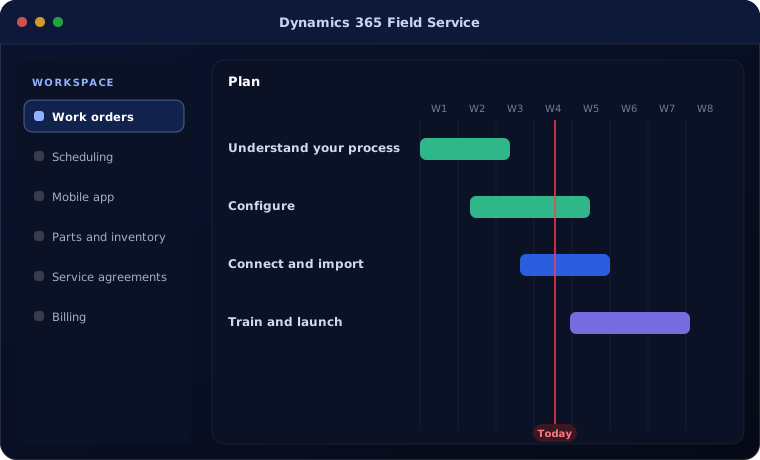
We implement Field Service in phases.
Understand your process
We review how your team works today and what Field Service needs to do.
You receive A short requirements summary
Configure
We set up Field Service with your fields, stages, templates, users and permissions.
You receive A configured system
Connect and import
We import your data and connect the tools you already use.
You receive Your data, ready to use
Train and launch
Your team is trained on real tasks and we support the first weeks.
You receive A live system your team uses
Problems we are asked to solve
These are the situations clients most often bring to us.
| The situation | What we do |
|---|---|
| Technicians visit without the right parts | Plan parts with work orders |
| Jobs completed but not billed | Link work orders to billing |
| Customers not informed of arrival time | Use scheduling and notifications |
Related products
Field Service links to these.
Common questions
Does the mobile app work offline?
Yes. Technicians can work offline and sync when connected.
Can it schedule by skills and location?
Yes. Scheduling considers skills, territory and availability.
Does it integrate with Business Central for invoicing?
Yes. Work orders can flow to Business Central for invoicing.
How this page is maintained. Written and reviewed by the BookMyTechies implementation team, based on our project work. Product details are checked against Microsoft’s documentation, and pricing is linked to Microsoft’s own page because it changes.
Explore further
The same job on other platforms
AI automation for this
Often used alongside
Running field service on spreadsheets?
Tell us how jobs are scheduled today. We will show you how Field Service would run them.