AI data extraction from any document
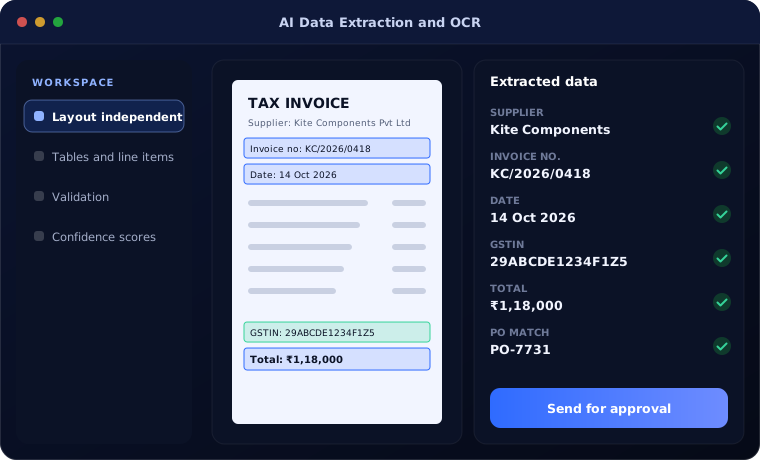
AI data extraction reads invoices, orders, forms, contracts and statements, checks what it reads and loads the data into your business systems, replacing manual typing.
At a glance
| What AI does | Reads documents, extracts fields and tables, checks values |
| Documents | Invoices, purchase orders, forms, contracts, statements, IDs |
| Works with | Zoho, Odoo, Dynamics 365, Business Central and databases |
| People stay in charge of | Low-confidence values and exceptions |
The short answer
AI data extraction goes beyond traditional OCR. OCR turns an image into text; AI understands the document, finds the fields and tables you need regardless of layout, checks them against rules and your records, and passes them to your systems. Values the AI is unsure about are shown to a person to confirm.
Why manual data entry persists
Businesses receive documents in countless layouts. Template-based OCR breaks whenever a layout changes, so teams fall back to typing.
Typing is slow, error-prone and hard to scale at peak times.
How the work is usually done today
- Documents received by email or scan
- Values typed into systems
- Errors found later
- Peaks create backlogs
- No record of who entered what
What AI changes
AI reads documents the way a trained person would.
Layout independent
No template per supplier or form.
Tables and line items
Multi-line tables extracted accurately.
Validation
Totals, tax, dates and IDs checked against rules and records.
Confidence scores
Uncertain values sent for human review.
How AI data extraction works
From document to data:
Receive
Documents arrive from email, scanner or upload.
Handled by Automation
Read
AI extracts fields and tables.
Handled by AI agent
Validate
Values checked against rules and records.
Handled by AI agent
Confirm
People review low-confidence values.
Handled by Person
Load
Data written to the target system.
Handled by Automation
Where people stay in control
Accuracy is checked, not assumed.
- Low-confidence values always go to review
- Accuracy measured on your documents before go-live
- Original documents linked to every record
- Corrections improve future results
Security and governance
- Access limited to the documents and records each step needs
- Every automated action logged with who or what made it
- Data kept in your own systems and approved cloud services
Systems this connects to
What you can expect
Typical outcomes:
- Most data entry removed
- Fewer typing errors
- No backlog at peak times
- Searchable, linked documents
Common questions
How is this different from OCR?
OCR only converts images to text. AI data extraction understands which values are which and checks them.
Does it read handwriting?
Clear handwriting can often be read; we test your documents to confirm accuracy before relying on it.
What document volumes can it handle?
From a few hundred to many thousands per month; costs scale with volume.
Where is the data processed?
On approved cloud AI services or your Azure tenant, configured not to use your data for model training.
Explore further
Platforms this automation runs on
Often used alongside
Industries where this matters
How many documents does your team type each month?
Send us a few sample documents. We will show you what AI data extraction can read from them.