Zoho Bigin setup for small business pipelines
We set up Zoho Bigin, the simple pipeline CRM from Zoho, so small teams can track every enquiry and deal without the weight of a full CRM.
At a glance
| What it is | A lightweight pipeline CRM for small businesses |
| Best for | Small teams moving off spreadsheets and inboxes |
| Works with | Zoho Books, Zoho Forms, email, telephony and WhatsApp |
| Our role | Setup, import, integration, training and upgrade path to Zoho CRM |
| Pricing | See Zoho’s website for current plans |
The short answer
Zoho Bigin is a pipeline-centric CRM built for small businesses. It tracks contacts, companies and deals through simple pipelines, with email, calls and activities in one place. BookMyTechies sets up Bigin around your sales process and, when you grow, moves you to Zoho CRM without losing data.
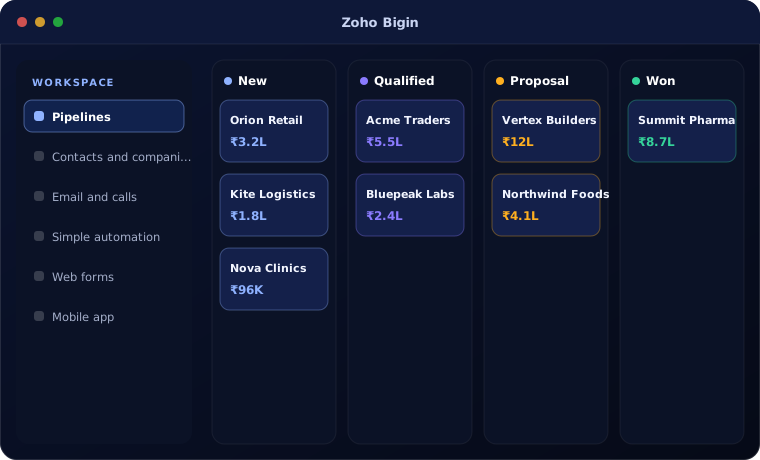
What Zoho Bigin does
Zoho Bigin focuses on the essentials a small team needs.
Pipelines
Deals tracked through stages you define, with several pipelines if needed.
Contacts and companies
Every customer and conversation in one record.
Email and calls
Emails, calls and notes linked to each deal.
Simple automation
Reminders and follow-ups that keep deals moving.
Web forms
Enquiries from your website arrive as new deals.
Mobile app
Update deals and log calls on the move.
Is Zoho Bigin the right fit?
Zoho Bigin is the right start for many small businesses, but not for every team.
A strong fit when
- You are a small team using spreadsheets or email to track sales
- You want a CRM running in days, not months
- You need simple pipelines rather than complex processes
Look elsewhere when
- You need advanced territories, forecasting or deep customisation, where Zoho CRM fits
- You have a large sales team with complex approvals
How we implement Zoho Bigin
A Bigin rollout is quick and focused.
Understand your process
We review how your team works today and what Bigin needs to do.
You receive A short requirements summary
Configure
We set up Bigin with your fields, stages, templates, users and permissions.
You receive A configured system
Connect and import
We import your data and connect the tools you already use.
You receive Your data, ready to use
Train and launch
Your team is trained on real tasks and we support the first weeks.
You receive A live system your team uses
Problems we are asked to solve
These are the situations clients most often bring to us.
| The situation | What we do |
|---|---|
| Enquiries are lost in personal inboxes | Capture them into Bigin pipelines automatically |
| Nobody knows the status of a deal | Set up stages and a pipeline view for the team |
| We outgrew Bigin | Move data and processes to Zoho CRM |
Related products
Bigin often grows into these.
Common questions
What is the difference between Zoho Bigin and Zoho CRM?
Bigin is simpler and focused on pipelines for small teams. Zoho CRM adds advanced automation, customisation, analytics and scale.
Can we move from Bigin to Zoho CRM later?
Yes. Zoho supports moving from Bigin to Zoho CRM, and we handle the mapping and setup.
How long does a Bigin setup take?
Usually a few days to two weeks, depending on data and integrations.
How this page is maintained. Written and reviewed by the BookMyTechies implementation team, based on our project work. Product details are checked against Zoho’s documentation, and pricing is linked to Zoho’s own page because it changes.
Explore further
The same job on other platforms
AI automation for this
Often used alongside
Want a simple CRM your small team will use?
Tell us how you sell today. We will set up Zoho Bigin around it.