AI automation with Zoho
We add AI automation to Zoho, using Zia where it fits and custom integrations where it does not, across CRM, Books, Desk and Creator.
The short answer
Zoho includes its own assistant, Zia, and automation tools such as workflow rules and Zoho Flow. For work those do not cover, external AI models can be connected through Zoho's scripting and interfaces. BookMyTechies combines the built-in features with custom automation, so AI works inside the Zoho apps your team already uses.
Zoho holds your data, but people still do the routine work
Most Zoho customers use a small part of what the platform can automate. Leads are still assigned by hand, bills typed in, tickets sorted by an agent and reports exported.
The built-in AI is often switched on but never configured for the business.
How the work is usually done today
- Data enters Zoho from forms, email and imports
- Users read and sort it
- They update records and create follow-ups by hand
- They copy information between Zoho apps
- They export data to build reports
What AI changes
We use what Zoho provides first, and extend it where your process needs more.
Zia, configured properly
Predictions, suggestions and anomaly alerts set up on your data and stages.
Workflows and Zoho Flow
Routine steps automated within and between Zoho apps.
Custom AI integrations
External AI models connected for document reading, drafting and classification.
Agents in Zoho Creator
Custom apps and agents for processes the standard apps do not cover.
How the automation works
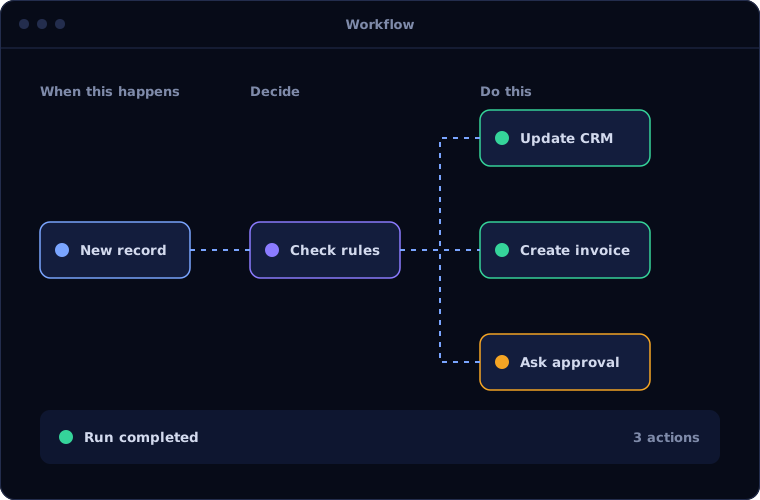
A typical automation inside Zoho follows this pattern.
Trigger
A record is created or changed in a Zoho app.
Handled byYour systemsInterpret
The content is read and classified.
Handled byAIApply rules
Your workflow rules decide the next step.
Handled byYour systemsApprove
Cases needing judgement go through a Zoho approval.
Handled byPersonUpdate
Records are updated across the connected Zoho apps.
Handled byYour systems
Where people stay in control
Zoho's own approval and permission features keep people in charge.
- Approvals use Zoho's native approval process
- Roles and profiles control what automation can change
- Each automated update is recorded in the record history
- Rules can be adjusted by your own administrator
Security and governance
- The AI works only with the data and systems it has been given access to
- Every automated action is logged with what was done, when and why
- Confidential data is handled under your access rules, and we agree where it is processed before work starts
Systems this connects to
What you can expect
Results depend on your volumes and how clean your data is, so we measure a baseline first and report against it. We do not quote figures before we have seen the process.
- More value from the Zoho licences you already pay for
- Less copying between apps
- Faster response to leads and tickets
- Automation your administrator can maintain
Common questions
Do we need Zoho One for this?
No, though more apps give more to connect. We work with whichever Zoho apps you have.
Is Zia enough on its own?
For predictions and suggestions inside the apps, often yes. For reading documents or handling unusual processes, custom integration is usually needed.
Can external AI models be used with Zoho?
Yes. They can be connected through Zoho's scripting language and interfaces, with care over what data is sent.
Will this work with our existing customisations?
We review them first. Automation is built to work with your current setup, not around it.
Using Zoho but still doing things by hand? Talk to us.
Tell us which Zoho apps you use and where the manual work is. We will show you what can be automated.